Blue-Green vs Canary Deployments: A Trade-Off Analysis for Production Systems
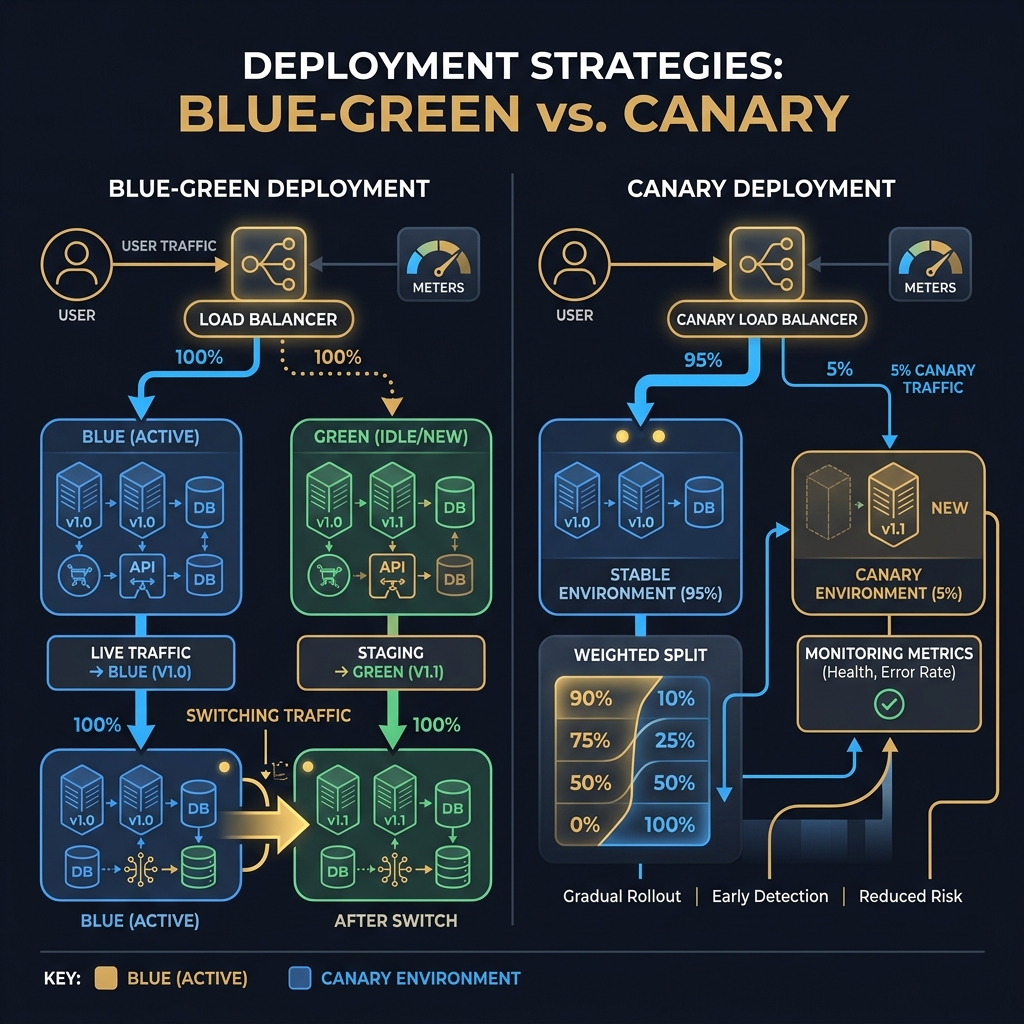
Every production deployment is a controlled experiment with real users as subjects. Blue-green and canary strategies differ not just in traffic splitting mechanics, but in their rollback speed, database migration constraints, and the sophistication of the feature flag synchronization they require — and choosing wrong costs you either reliability or release velocity.
Concept
Deployment strategy is not a DevOps afterthought — it is an architectural decision that shapes your system's reliability contract with users. The two dominant strategies for zero-downtime production releases are blue-green deployments and canary releases. They share a goal (deploy without user impact) but differ fundamentally in risk model, database compatibility, and operational complexity.
Blue-Green Deployments
In a blue-green deployment, two identical production environments exist simultaneously: the "blue" environment (currently serving 100% of production traffic) and the "green" environment (the new version, fully deployed and verified but not yet live). Deployment proceeds as:
- Deploy the new version to the green environment
- Run automated smoke tests and synthetic transactions against green
- Switch the load balancer to route 100% of traffic from blue to green
- Monitor green for an observation window (typically 5–30 minutes)
- If stable: decommission or keep blue on standby for rollback. If unstable: switch back to blue instantly.
The defining characteristic of blue-green is the atomic cutover: one moment, all traffic is on blue; the next, all traffic is on green. There is no partial state. This binary nature is both its greatest strength (rollback is instant) and its greatest constraint (you cannot gradually observe the new version's behavior under real load before full exposure).
Canary Deployments
A canary release incrementally shifts a percentage of production traffic from the old version to the new version. The name comes from the mining practice of using canaries to detect toxic gas — a small cohort of users acts as the leading indicator of failure before the full deployment proceeds.
Traffic shifting typically follows a progressive schedule: 1% → 5% → 25% → 50% → 100%, with automated or manual promotion gates between each stage. Each stage is an observation window where metrics are evaluated against the previous version's baseline.
The canary's defining characteristic is gradual exposure with differential observability: you can directly compare the new version's error rate, latency, and business metrics against the incumbent version on real production traffic, at any traffic split ratio.
Traffic Splitting Mechanics
Both strategies rely on traffic splitting at the load balancer or ingress layer. The mechanics differ:
Blue-green: The load balancer has two upstream groups (blue, green). The switch is a configuration change: upstream = green. On Kubernetes with Argo Rollouts or FluxCD: a Service selector change from version=blue to version=green. This is nearly instantaneous (typically < 30 seconds for DNS TTL propagation or controller reconciliation).
Canary (weighted routing): The load balancer distributes traffic by weight. On AWS ALB: listener rules with weighted target groups. On Kubernetes with Istio: a VirtualService with weight: 5 for the canary and weight: 95 for the stable version. On NGINX Ingress: the nginx.ingress.kubernetes.io/canary-weight annotation.
The weight math is simple but has important constraints: at 1% canary traffic, you need roughly 100× the baseline sample size to achieve the same statistical confidence. If your service handles 100 RPS and your baseline error rate is 0.1%, you need approximately 10 minutes at 1% canary to detect a regression to 1% error rate with 95% confidence. At 100 RPS total, 1 RPS reaches the canary — one error per 100 seconds is the detection threshold.
Constraints
The Database Migration Problem
The most critical constraint of both strategies is schema and data migration compatibility. A blue-green cutover sends 100% of traffic from V1 to V2 of the application in one step. If V2 requires a schema change (renamed column, new non-nullable column, removed column), one of two things happens:
The migration runs before the cutover: The new schema is live before the new code, meaning V1 application code must be compatible with the new schema. This works only if the migration is additive (new columns with defaults, no destructive changes).
The migration runs after the cutover: V2 code is live before the schema change. The code must handle both the old and new schema until the migration completes. This is the expand-and-contract pattern.
Expand-and-contract (also: parallel change) is the only reliable database migration strategy for zero-downtime deployments under either strategy:
- Expand: Add the new column (nullable) alongside the old one. Both V1 and V2 code works.
- Migrate: Backfill the new column. Dual-write V1→old, V2→both.
- Contract: Once 100% of traffic is on V2 and backfill is complete, drop the old column.
This converts one risky migration into three safe, reversible steps — but each step requires a separate deployment cycle. For canary releases, this is especially important: at 50/50 traffic split, both V1 and V2 pods are writing to the same database simultaneously, and both must be able to read each other's writes correctly.
Rollback Time Comparison
| Strategy | Rollback Mechanism | Rollback Time | Data Rollback? |
|---|---|---|---|
| Blue-green | Switch load balancer back to blue | < 30 seconds | Not typically needed if schema is compatible |
| Canary | Reduce canary weight to 0% | < 60 seconds | Not needed — canary writes go to same DB |
| Full deployment (no strategy) | Redeploy previous image | 5–15 minutes | Manual |
Blue-green has the fastest rollback for traffic: the load balancer switch is sub-minute. However, if V2 wrote data to the database that V1 cannot understand, switching back to blue does not undo those writes. Schema compatibility is a prerequisite for rollback safety in both strategies.
Feature Flag Synchronization
Canary deployments often need to be coordinated with feature flags to ensure that the canary cohort (users routed to V2) has consistent experiences. If user A hits V2 on request 1 and V1 on request 2, and V2 has a different session handling behavior, the user may see inconsistent behavior.
Sticky sessions (session affinity at the load balancer) ensure a user is consistently routed to the same version for the duration of their session. This is essential for UX consistency and accurate canary metric attribution.
Trade-offs
When to Choose Blue-Green
Blue-green is the right choice when:
- Your release cadence is low (weekly or less) and full environment validation is feasible
- The new version has a known risk profile (well-tested, minor changes) where gradual observation is unnecessary
- You cannot statistically distinguish canary metrics from baseline (low-traffic services)
- Your rollback SLA demands sub-minute recovery (financial transactions, regulated systems)
- The team lacks the infrastructure maturity for gradual traffic shifting
When to Choose Canary
Canary is the right choice when:
- High traffic volume (> 1,000 RPS) makes 1% samples statistically meaningful
- You need to validate user behavior (click-through rates, conversion) not just technical metrics
- The change has high uncertainty (new algorithm, new recommendation engine, significant UX change)
- SRE culture mandates progressive delivery with automated rollback gates
- You have feature flag infrastructure for sticky session routing
The Hybrid: Blue-Green with Canary Phases
Production-mature organizations often combine both: deploy to green, run a canary phase by shifting 1–10% of traffic to green while blue remains the primary, promote fully to green after validation, and keep blue on standby. This provides the observation benefit of canary with the rollback speed of blue-green.
Code
The following shows an ASP.NET Core middleware that implements canary user routing based on a consistent hash of the user ID — ensuring sticky assignment to canary or stable for the duration of the experiment:
// CanaryRoutingMiddleware.cs
// Routes a deterministic percentage of users to canary based on user ID hash
// Ensures the same user always gets the same version (sticky canary assignment)
public class CanaryRoutingMiddleware
{
    private readonly RequestDelegate _next;
    private readonly IOptionsMonitor<CanaryConfig> _config;
    private readonly ILogger<CanaryRoutingMiddleware> _logger;

    public CanaryRoutingMiddleware(
        RequestDelegate next,
        IOptionsMonitor<CanaryConfig> config,
        ILogger<CanaryRoutingMiddleware> logger)
    {
        _next = next;
        _config = config;
        _logger = logger;
    }

    public async Task InvokeAsync(HttpContext context)
    {
        var config = _config.CurrentValue;

        if (config.IsCanaryEnabled)
        {
            var userId = context.User.FindFirst(ClaimTypes.NameIdentifier)?.Value
                         ?? context.Connection.RemoteIpAddress?.ToString()
                         ?? Guid.NewGuid().ToString();

            bool isCanaryUser = IsInCanaryCohort(userId, config.CanaryPercentage);

            // Tag request with version for metrics attribution
            context.Items["deployment-version"] = isCanaryUser ? "canary" : "stable";
            context.Response.Headers["X-Deployment-Version"] =
                isCanaryUser ? "canary" : "stable";

            if (isCanaryUser)
            {
                _logger.LogDebug(
                    "User {UserId} assigned to canary cohort ({Percentage}%)",
                    userId[..Math.Min(8, userId.Length)], config.CanaryPercentage);
            }
        }

        await _next(context);
    }

    /// <summary>
    /// Deterministic cohort assignment: same user always gets the same result.
    /// Uses consistent hash so canary percentage changes only affect users near the boundary.
    /// </summary>
    private static bool IsInCanaryCohort(string userId, double canaryPercentage)
    {
        // FNV-1a hash for speed — not for security
        uint hash = 2166136261;
        foreach (char c in userId)
        {
            hash ^= (byte)c;
            hash *= 16777619;
        }

        // Map hash to 0–100 range
        double position = (hash % 10000) / 100.0;
        return position < canaryPercentage;
    }
}

public class CanaryConfig
{
    public bool IsCanaryEnabled { get; set; }
    public double CanaryPercentage { get; set; } // 0–100
}
The second example shows an automated canary promotion gate: a background service that evaluates canary metrics and triggers promotion or rollback based on statistical thresholds:
// CanaryPromotionGateService.cs
// Evaluates canary health metrics and drives progressive traffic shift
public class CanaryPromotionGateService : BackgroundService
{
    private readonly IMetricsClient _metricsClient;
    private readonly IDeploymentController _deploymentController;
    private readonly IOptionsMonitor<CanaryGateConfig> _gateConfig;
    private readonly ILogger<CanaryPromotionGateService> _logger;

    private static readonly double[] ProgressionSteps = { 1, 5, 25, 50, 100 };

    public CanaryPromotionGateService(
        IMetricsClient metricsClient,
        IDeploymentController deploymentController,
        IOptionsMonitor<CanaryGateConfig> gateConfig,
        ILogger<CanaryPromotionGateService> logger)
    {
        _metricsClient = metricsClient;
        _deploymentController = deploymentController;
        _gateConfig = gateConfig;
        _logger = logger;
    }

    protected override async Task ExecuteAsync(CancellationToken stoppingToken)
    {
        var config = _gateConfig.CurrentValue;
        int stepIndex = 0;

        while (!stoppingToken.IsCancellationRequested && stepIndex < ProgressionSteps.Length)
        {
            double targetWeight = ProgressionSteps[stepIndex];

            _logger.LogInformation(
                "Canary gate: shifting traffic to {Weight}%", targetWeight);

            await _deploymentController.SetCanaryWeightAsync(targetWeight, stoppingToken);

            // Observation window: allow metrics to stabilize
            await Task.Delay(config.ObservationWindowMs, stoppingToken);

            var canaryMetrics = await _metricsClient.GetMetricsAsync(
                "canary", TimeSpan.FromMinutes(5), stoppingToken);
            var stableMetrics = await _metricsClient.GetMetricsAsync(
                "stable", TimeSpan.FromMinutes(5), stoppingToken);

            bool errorRateExceeded = canaryMetrics.ErrorRatePercent
                                     > stableMetrics.ErrorRatePercent * config.MaxErrorRateRatio;
            bool p99LatencyExceeded = canaryMetrics.P99LatencyMs
                                      > stableMetrics.P99LatencyMs * config.MaxLatencyRatio;

            if (errorRateExceeded || p99LatencyExceeded)
            {
                _logger.LogError(
                    "Canary gate FAILED at {Weight}%: ErrorRate={CanaryError:F2}% " +
                    "(baseline {StableError:F2}%), P99={CanaryP99:F0}ms (baseline {StableP99:F0}ms). " +
                    "Rolling back to 0%.",
                    targetWeight,
                    canaryMetrics.ErrorRatePercent, stableMetrics.ErrorRatePercent,
                    canaryMetrics.P99LatencyMs, stableMetrics.P99LatencyMs);

                await _deploymentController.SetCanaryWeightAsync(0, stoppingToken);
                await _deploymentController.TriggerRollbackAsync(stoppingToken);
                return;
            }

            _logger.LogInformation(
                "Canary gate PASSED at {Weight}%: ErrorRate={CanaryError:F2}%, P99={CanaryP99:F0}ms",
                targetWeight, canaryMetrics.ErrorRatePercent, canaryMetrics.P99LatencyMs);

            stepIndex++;
        }

        _logger.LogInformation("Canary promotion complete — 100% traffic on new version.");
    }
}

public class CanaryGateConfig
{
    public int ObservationWindowMs { get; set; } = 300_000; // 5 minutes per step
    public double MaxErrorRateRatio { get; set; } = 1.5;    // Allow up to 1.5x baseline error rate
    public double MaxLatencyRatio { get; set; } = 1.2;      // Allow up to 1.2x baseline p99
}
Further Reading
- Module 13 – Reliability Engineering & SLOs — defining error rate and latency SLOs that power canary gates
- Module 16 – Governance — change management policies and deployment approval workflows
- Module 3 – Distributed Systems Fundamentals — consistency during dual-version operation windows
- Module 5 – Storage Engines & Database Internals — expand-and-contract migration patterns at the schema level
External references:
- Humble, J. & Farley, D. (2010). Continuous Delivery. Addison-Wesley.
- Argo Rollouts: https://argoproj.github.io/rollouts/
- Sridharan, C. (2018). Distributed Systems Observability. O'Reilly.