The C4 Model: Architecture Documentation That Engineers Actually Read
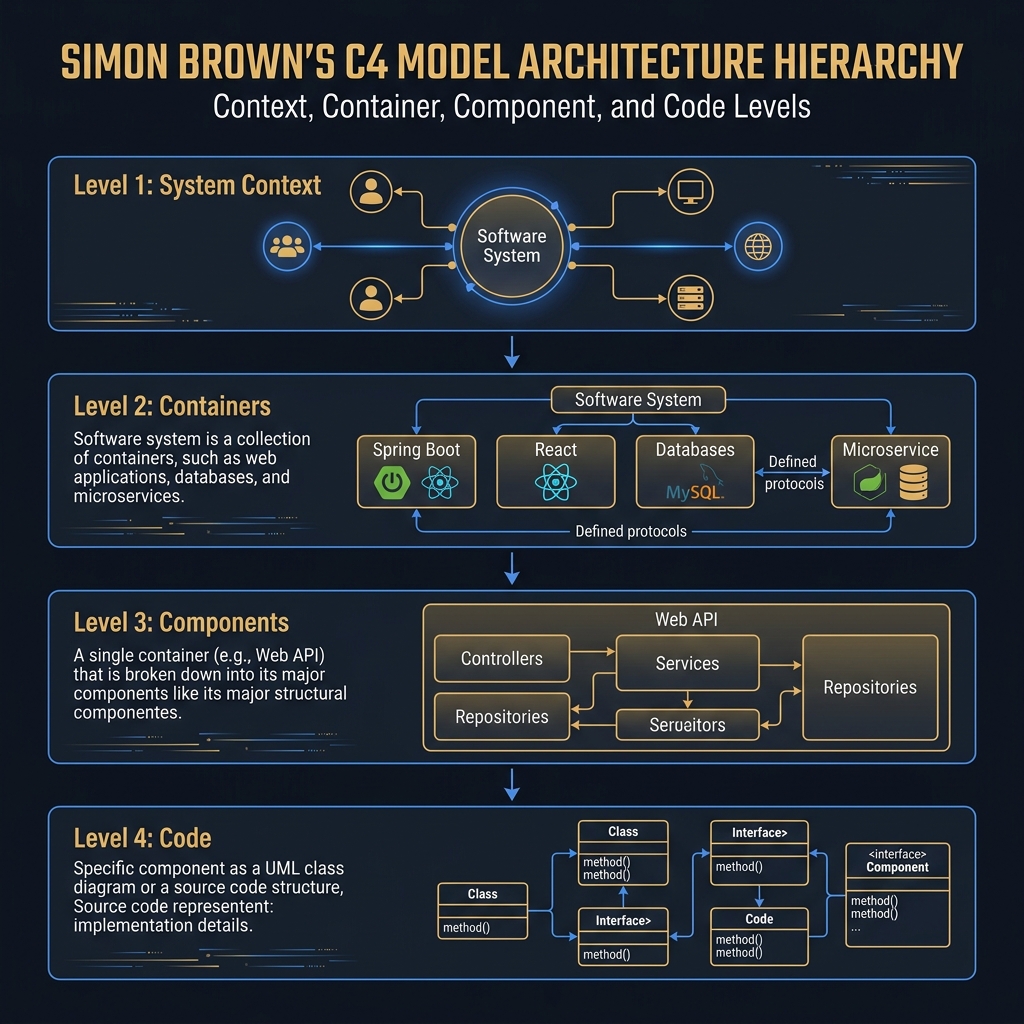
Architecture diagrams fail when they try to show everything at once, producing visuals that are simultaneously too detailed to scan and too abstract to act on. The C4 model solves this by assigning each zoom level a specific audience and a specific set of decisions it must answer.
The fundamental problem with most architecture documentation is audience mismatch. A diagram that is useful to a developer reasoning about component boundaries is incomprehensible to a non-technical stakeholder. A diagram that a CTO can read in 30 seconds contains none of the information a developer needs when debugging a cross-service issue. Teams respond to this mismatch in one of two ways: they produce multiple disconnected diagrams that immediately fall out of sync, or they produce a single diagram that tries to serve every audience and succeeds for none.
Simon Brown's C4 model addresses this by formalizing four zoom levels, each with a specific audience, a specific vocabulary, and a defined scope of what is in and out of frame. The zoom levels are not a hierarchy — they are lenses. Each shows the system through a different aperture, and the disciplined use of all four gives you a documentation suite that is both complete and usable.
Concept
Level 1: System Context Diagram
The context diagram answers one question: how does this system fit into the world? It shows the system as a single box, surrounded by the people (actors) and external systems it interacts with. It does not show technology, it does not show internal components, and it does not show data flows beyond the direction of the relationship.
The audience is anyone — including non-technical stakeholders — who needs to understand what the system does and who it connects to. The vocabulary is intentionally non-technical: "Customer Service Portal sends customer data to the CRM System."
What belongs in a context diagram:
- The system being described (one box)
- External users (actors: employees, customers, administrators)
- External systems (third-party services, partner APIs, other internal systems your system calls or is called by)
- The nature of each relationship in plain language
What does not belong:
- Technology choices
- Internal components or services
- Database schemas
- API endpoints
The most common mistake is showing multiple internal systems in the context diagram because the team thinks of them as separate things. If you own all of them and they form a coherent business capability, they should be shown as one box at this level.
Level 2: Container Diagram
"Container" in C4 means anything that executes code or stores data — not Docker containers specifically. A web application, an API service, a mobile app, a database, a message queue, a file store — each is a container.
The container diagram zooms into the system and shows what these runtime units are, what technologies they use, and how they communicate. The audience is technical: developers and architects who need to understand the technology choices and the communication topology.
What belongs in a container diagram:
- Every independently deployable unit (web app, API, background worker, database)
- The technology or runtime of each (ASP.NET Core, PostgreSQL, Redis, React)
- The communication protocols between containers (HTTP/REST, gRPC, AMQP, TCP)
- External actors and systems that interact with the boundary containers
What does not belong:
- Individual classes or functions
- SQL table schemas
- Every API endpoint
The container diagram is the most strategically valuable level because it reveals the key architectural decisions: deployment topology, technology choices, communication patterns, and data store allocation. This is the diagram that should be updated when any of those decisions change.
Level 3: Component Diagram
The component diagram zooms into a single container and shows the major structural groupings of code within it — the components. In a domain-driven application, these might be bounded contexts, aggregates, or use case handlers. In a layered application, these might be controllers, services, and repositories.
The audience is the developers working inside that specific container. The component diagram is not for cross-system discussions — it is for understanding how work within a single container is organized and where to find specific functionality.
This is the level that is most prone to becoming stale, because code changes continuously. Teams that attempt to maintain exhaustive component diagrams for every container find them perpetually out of date. A more sustainable approach is to document component diagrams only for containers that are architecturally complex or that onboard new developers frequently, and to accept that these diagrams represent the intended structure rather than a real-time code snapshot.
Level 4: Code Diagram
The code level maps directly to implementation — class diagrams, sequence diagrams, or entity-relationship diagrams. Most teams do not explicitly produce Level 4 diagrams because IDEs and code tools generate them on demand. The C4 model acknowledges that Level 4 is rarely worth maintaining by hand except for the most algorithmically complex or security-critical code paths.
The Notation Decision
C4 does not mandate a specific notation. Simon Brown provides a set of consistent shapes and labels for his own DSL (Structurizr DSL), but the model works equally well with draw.io, PlantUML, Lucidchart, or even whiteboard photos, as long as each diagram clearly labels elements, relationships, and technologies, and includes a legend.
The single most important notation convention is explicit labeling of relationships. A line between two boxes is nearly meaningless without a label. The label should express what kind of interaction occurs ("Sends order confirmation via SMTP"), not merely that a connection exists.
Constraints
Diagram rot is the default outcome: Without a defined owner and a defined update trigger, all diagrams become stale. The C4 model does not solve the maintenance problem by itself. The solve is to attach diagram updates to the same pull request gate that deploys infrastructure or architectural changes. A PR that adds a new microservice should include an update to the Level 2 container diagram as a required artifact.
Tooling lock-in vs. accessibility: Structurizr DSL produces C4 diagrams as code (diagrams-as-code), which can be versioned in Git and diffed like source code. The cost is a learning curve and a hosted service dependency for rendering. Draw.io files are accessible to everyone but are binary XML blobs that produce unusable diffs. Choose based on your team's workflow: if you can enforce the habit of editing diagrams as code, Structurizr is worth the investment.
Boundary agreement: The hardest part of drawing a context diagram is agreeing on what is "in system" and what is "external." If your organization has 15 microservices that collectively implement a business domain, are they one system or fifteen? C4 recommends grouping by team ownership: if one team owns and deploys all 15, they are one system at the context level. If separate teams own separate services, each service might be a separate system that appears as an external dependency.
Component diagram completeness trade-off: An exhaustive component diagram for a 50-class service is a maintenance burden. A curated component diagram showing only the 8–12 major structural groupings provides high value with manageable maintenance cost. Decide explicitly what level of completeness you will maintain and document that decision on the diagram itself.
Trade-offs
The C4 model's primary trade-off is investment in maintenance vs. documentation quality. Teams that invest in tooling (Structurizr, PlantUML in CI) and process (PR gates, architecture review sessions) get documentation that remains accurate and builds shared understanding. Teams that treat C4 as a one-time activity get diagrams that are accurate for 60 days and misleading thereafter.
The model also trades detail for readability at each level. A context diagram that shows only the system and its external connections is immediately readable but hides complexity. A container diagram that shows all communication paths is accurate but can be dense for large systems. The discipline is resisting the urge to add detail at a level that doesn't warrant it — every element added to a context diagram is one element that might require a non-technical stakeholder to ask "what is that?"
Compared to alternatives — UML (comprehensive but rarely read), Wikipedia-style prose documentation (readable but not structured), and ad-hoc whiteboard diagrams (immediately relevant but impermanent) — C4 occupies a middle ground that emphasizes navigability: each zoom level links to the next, and any developer can navigate from system overview to component detail by moving through the levels.
Code
Structurizr DSL for a Context and Container Diagram
The following is a complete Structurizr DSL definition that produces a C4 Level 1 and Level 2 diagram for an e-commerce order management system. Structurizr DSL is stored as a .dsl text file in source control, rendered via the Structurizr CLI or cloud service.
workspace "OrderManagementSystem" "Manages the order lifecycle from placement to fulfillment" {

    model {
        // === Actors ===
        customer = person "Customer" "Places orders via the storefront or mobile app."
        customerService = person "Customer Service Agent" "Handles order queries and refunds via the admin portal."

        // === External Systems ===
        paymentGateway = softwareSystem "Stripe" "Processes card payments and refunds." "External"
        shippingProvider = softwareSystem "ShipStation" "Generates shipping labels and tracks deliveries." "External"
        emailPlatform = softwareSystem "SendGrid" "Delivers transactional and marketing emails." "External"
        legacyERP = softwareSystem "Legacy ERP" "Owns inventory levels and supplier data." "External,Legacy"

        // === Our System ===
        orderSystem = softwareSystem "Order Management System" "Handles order placement, fulfillment, and post-purchase operations." {

            // === Containers within our system ===
            storefrontApi = container "Storefront API" "Serves the public-facing order API consumed by the web and mobile apps." "ASP.NET Core 8" "API"
            adminPortal = container "Admin Portal" "Internal SPA for customer service agents." "React + TypeScript" "WebApp"
            orderProcessor = container "Order Processor" "Background worker that fulfills confirmed orders." "ASP.NET Core Worker Service" "Worker"
            orderDatabase = container "Order Database" "Stores all order and line-item data." "PostgreSQL 15" "Database"
            eventBus = container "Event Bus" "Distributes domain events between services." "RabbitMQ" "MessageBroker"
            cacheLayer = container "Cache" "Caches product catalog and session data." "Redis 7" "Cache"

            // === Container relationships ===
            storefrontApi -> orderDatabase "Reads and writes orders" "TCP/SQL"
            storefrontApi -> cacheLayer "Caches product data and sessions" "Redis protocol"
            storefrontApi -> eventBus "Publishes OrderPlaced events" "AMQP"
            orderProcessor -> eventBus "Subscribes to OrderPlaced events" "AMQP"
            orderProcessor -> orderDatabase "Updates fulfillment status" "TCP/SQL"
            orderProcessor -> paymentGateway "Charges payment method" "HTTPS/REST"
            orderProcessor -> shippingProvider "Creates shipping labels" "HTTPS/REST"
            orderProcessor -> emailPlatform "Sends order confirmation emails" "HTTPS/REST"
            adminPortal -> storefrontApi "Calls internal admin endpoints" "HTTPS/REST"
        }

        // === Actor-to-system relationships (Level 1) ===
        customer -> orderSystem "Places and tracks orders" "HTTPS"
        customerService -> orderSystem "Views and manages orders" "HTTPS"
        orderSystem -> legacyERP "Queries real-time inventory levels" "HTTPS/REST"

        // === Actor-to-container relationships (Level 2) ===
        customer -> storefrontApi "Places orders, checks status" "HTTPS/REST"
        customerService -> adminPortal "Manages orders and refunds" "HTTPS"
    }

    views {
        systemContext orderSystem "SystemContext" {
            include *
            autoLayout lr
            description "Level 1: How the Order Management System fits into the broader ecosystem."
        }

        container orderSystem "Containers" {
            include *
            autoLayout lr
            description "Level 2: The deployable units within the Order Management System."
        }

        styles {
            element "External"  { background #999999; color #ffffff; }
            element "Legacy"    { background #cc6600; color #ffffff; }
            element "Database"  { shape Cylinder; }
            element "MessageBroker" { shape Pipe; }
            element "Cache"     { shape Cylinder; }
            element "WebApp"    { shape WebBrowser; }
            element "API"       { shape RoundedBox; }
            element "Worker"    { shape Hexagon; }
            element Person      { shape Person; }
        }
    }
}
C# Architecture Test: Enforcing Layer Boundaries as Code
One of the most effective ways to keep component diagrams honest is to encode the intended layer dependencies as architecture tests. The following uses NetArchTest.Rules to verify that the domain layer has no references to infrastructure types — a machine-checkable version of the C4 component diagram's layer boundary.
// ArchitectureTests/LayerBoundaryTests.cs
// Run as part of the CI pipeline — fails the build if a layer violation is introduced
public class LayerBoundaryTests
{
    private const string DomainAssembly       = "MPC.Domain";
    private const string ApplicationAssembly  = "MPC.Application";
    private const string InfraAssembly        = "MPC.Infrastructure";
    private const string ApiAssembly          = "MPC.Api";

    [Fact(DisplayName = "Domain must not depend on Infrastructure")]
    public void Domain_ShouldHaveNoInfrastructureDependencies()
    {
        var result = Types.InAssembly(Assembly.Load(DomainAssembly))
            .ShouldNot()
            .HaveDependencyOn(InfraAssembly)
            .GetResult();

        Assert.True(result.IsSuccessful,
            $"Domain layer has forbidden dependency on Infrastructure:\n" +
            string.Join("\n", result.FailingTypeNames ?? []));
    }

    [Fact(DisplayName = "Application must not depend on Infrastructure or Api")]
    public void Application_ShouldNotDependOnInfrastructureOrApi()
    {
        var result = Types.InAssembly(Assembly.Load(ApplicationAssembly))
            .ShouldNot()
            .HaveDependencyOnAny(InfraAssembly, ApiAssembly)
            .GetResult();

        Assert.True(result.IsSuccessful,
            $"Application layer has forbidden dependency:\n" +
            string.Join("\n", result.FailingTypeNames ?? []));
    }

    [Fact(DisplayName = "All use case handlers must be sealed and non-public to domain callers")]
    public void UseCaseHandlers_ShouldBeSealedClasses()
    {
        var result = Types.InAssembly(Assembly.Load(ApplicationAssembly))
            .That().HaveNameEndingWith("UseCase")
            .Should().BeSealed()
            .GetResult();

        Assert.True(result.IsSuccessful,
            $"The following use case classes are not sealed (violation of OCP + testability):\n" +
            string.Join("\n", result.FailingTypeNames ?? []));
    }
}