Kubernetes for Architects: Control Planes, Scheduling, and Production Concerns
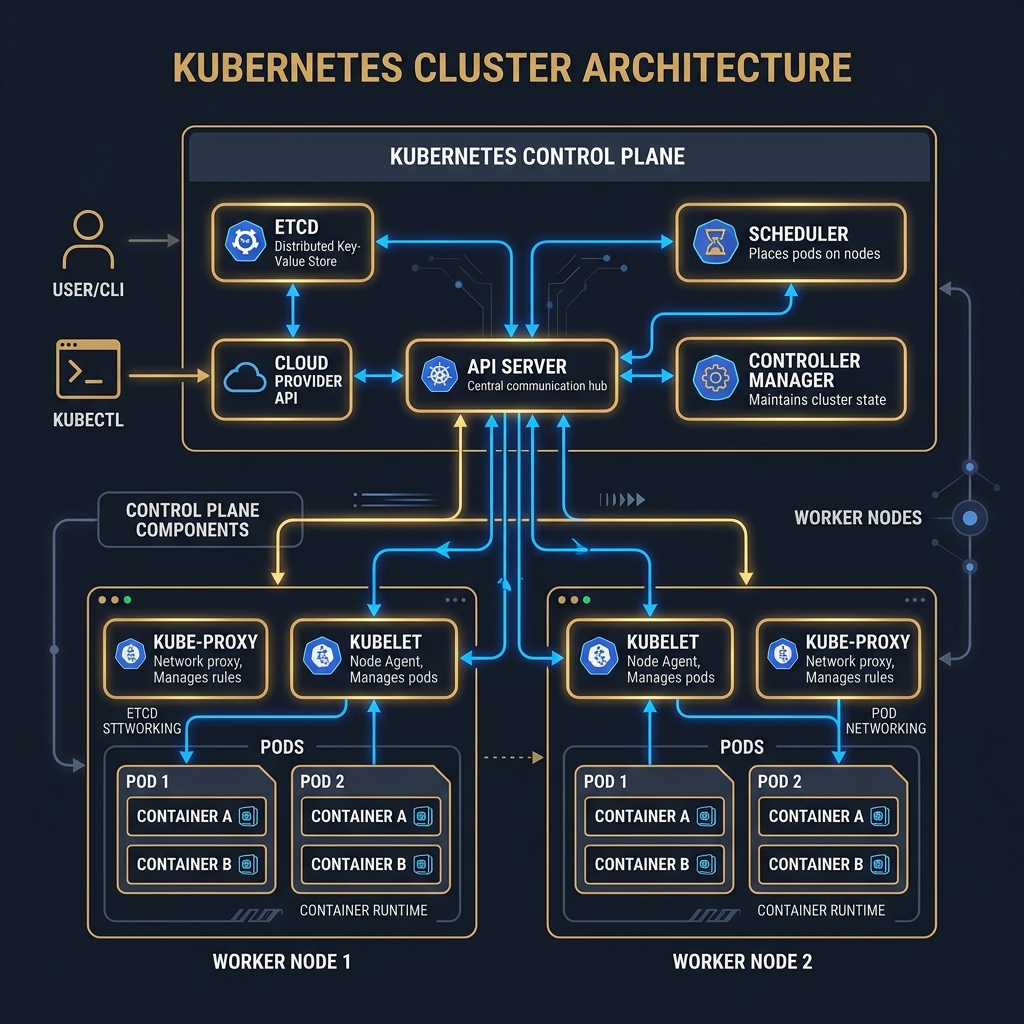
Kubernetes is not a deployment tool — it is a distributed system with its own consistency model, scheduling calculus, and failure domains. Architects who treat it as a black box make infrastructure decisions that quietly violate the guarantees they believe they have.
Most teams adopt Kubernetes because it is the industry standard for container orchestration, and that is a reasonable starting point. But "industry standard" does not mean "transparent" — and Kubernetes hides significant complexity behind declarative YAML abstractions that can mislead architects into assuming guarantees the system does not actually provide.
The gap between what engineers believe Kubernetes does and what it actually does becomes visible under exactly the conditions that matter most: high load, node failures, aggressive autoscaling, and resource contention. Understanding the control plane architecture, the scheduler's decision algorithm, and the contract between resource requests/limits and the underlying kernel scheduler is not optional for anyone making infrastructure design decisions.
Concept
The Control Plane
The Kubernetes control plane is a set of components that together implement the desired state management loop. It runs on dedicated master nodes (typically 3 for high availability) and is responsible for accepting API requests, storing cluster state, and driving worker nodes toward the declared desired state.
etcd: The cluster's state store. All Kubernetes objects — pods, deployments, services, config maps, secrets — are persisted as key-value entries in etcd, a distributed consensus database using the Raft protocol. etcd provides linearizable reads and writes, which means the API server can query the current state of any resource with the guarantee that it reflects the most recent write. etcd is the single source of truth; if etcd is unavailable, the cluster cannot schedule new pods or process API requests, though existing running pods continue to run.
kube-apiserver: The only component that writes to etcd directly. All cluster operations — kubectl apply, operator reconcile loops, the scheduler — go through the API server. The API server validates requests, applies admission webhooks, and persists approved changes to etcd. It is stateless and horizontally scalable; multiple API server replicas can run behind a load balancer.
kube-controller-manager: Hosts a set of controllers, each running a continuous reconciliation loop. The Deployment controller watches for Deployment objects and creates or deletes ReplicaSet objects to match the desired replica count. The ReplicaSet controller creates or deletes Pod objects. The Node controller monitors node health and evicts pods from nodes that become unresponsive. Each controller follows the same pattern: observe current state → compute difference from desired state → take corrective action.
kube-scheduler: Watches for pods in the "Pending" state (pods that have been created in etcd but not yet assigned to a node) and assigns each to a node using a two-phase algorithm. Understanding this algorithm is essential for anyone configuring resource requests, pod anti-affinity rules, or node selectors.
The Scheduler: Filtering and Scoring
The scheduler's algorithm runs in two phases per pod:
Phase 1 — Filtering (Predicates): The scheduler evaluates every node against a set of hard constraints. A node that fails any predicate is excluded from consideration. Predicates include: does the node have sufficient allocatable CPU and memory to satisfy the pod's resource requests? Does the pod's nodeSelector or nodeAffinity match the node's labels? Does the pod's podAntiAffinity rule conflict with pods already running on the node? Does the node have any taints that the pod does not tolerate?
If no nodes pass filtering, the pod remains Pending and a FailedScheduling event is emitted. This is the failure mode that produces mysterious "0/10 nodes are available" errors.
Phase 2 — Scoring (Priorities): Among nodes that passed filtering, the scheduler ranks them using scoring functions. The default scoring functions include: LeastAllocated (prefer nodes with the most remaining capacity), NodeAffinity (prefer nodes with preferred affinity matches), InterPodAffinity (prefer nodes that satisfy soft affinity rules). Each function produces a score from 0 to 100; the node with the highest weighted sum wins.
Resource Requests vs. Limits: The Critical Distinction
This is the most frequently misunderstood Kubernetes concept with the most significant production impact.
Resource requests declare the minimum resources a pod needs. The scheduler uses requests — not limits — to determine whether a node has capacity for a pod. If you request 500m CPU and 512Mi memory, the scheduler will only place your pod on a node with at least 500m CPU and 512Mi memory available in its allocatable pool. The node's allocatable pool is reduced by each placed pod's requests, regardless of actual usage.
Resource limits declare the maximum resources a pod may consume. The Linux kernel enforces limits via cgroups. A container that exceeds its CPU limit is throttled (its CPU time is rate-limited). A container that exceeds its memory limit is OOM-killed (SIGKILL, no grace period).
The implication: a pod with no CPU requests can be scheduled onto a node with 1m CPU remaining, even if the pod actually uses 2 cores. The scheduler doesn't know. This produces CPU starvation for other pods and unpredictable latency. Similarly, a pod with no memory limits can consume all available node memory, causing the kernel to OOM-kill other pods on the same node. Setting resource requests and limits is not optional tuning — it is the mechanism by which the scheduler makes correct decisions.
QoS Classes: Kubernetes assigns each pod a Quality of Service class based on its request/limit configuration:
- Guaranteed: requests == limits for all containers. The pod will not be OOM-killed unless it exceeds its own limit.
- Burstable: requests < limits or limits are unset for some containers. The pod can burst beyond requests; it may be OOM-killed if the node is under memory pressure.
- BestEffort: no requests or limits set. First to be evicted under node pressure. Never use this for production workloads.
Horizontal Pod Autoscaler Math
The HPA controller adjusts replica count based on observed metrics relative to target values. The scaling formula is:
desiredReplicas = ceil(currentReplicas × (currentMetricValue / desiredMetricValue))
For CPU utilization: if a deployment has 4 replicas with a target of 50% CPU utilization, and current utilization is 80%, the desired replicas = ceil(4 × (80/50)) = ceil(6.4) = 7.
The HPA has configurable stabilization windows (default 300 seconds for scale-down, 0 seconds for scale-up) that prevent thrashing. An architect designing HPA policies must balance:
- Scale-up responsiveness: How quickly can the cluster respond to traffic spikes? HPA polling interval is 15 seconds by default; new pods take 30–60 seconds to start and pass readiness probes. Total spike response time is often 60–90 seconds — a meaningful gap for sudden traffic events.
- Scale-down conservatism: Premature scale-down followed immediately by scale-up (thrashing) wastes pod startup time. The default 300-second stabilization window is often the right trade-off.
Pod Disruption Budgets
PodDisruptionBudget (PDB) is a resource that limits how many pods of a deployment or stateful set can be simultaneously unavailable during voluntary disruptions — node drains, cluster upgrades, or manual evictions. PDBs do not apply to involuntary disruptions (node hardware failures).
A PDB with minAvailable: 2 on a 3-replica deployment means the node drainer will not proceed if draining would leave fewer than 2 pods running. This prevents a cluster upgrade from causing a service interruption when a deployment has only 3 replicas and the drain sequence would temporarily evict 2.
Constraints
etcd performance as a ceiling: The entire control plane's throughput is bounded by etcd's write throughput. etcd is designed for strong consistency, not high throughput. The recommended etcd cluster size is 3 or 5 nodes; larger clusters increase read throughput but degrade write throughput due to the Raft consensus quorum. For very large clusters (1,000+ nodes), etcd write performance becomes a practical ceiling on the rate at which new pods can be scheduled.
API server admission webhook latency: Every kubectl apply or controller write passes through all registered admission webhooks before being persisted to etcd. Webhooks that are slow (>200ms) or fail open (allow requests when the webhook is unavailable) introduce latency or security gaps into the control plane critical path.
Node allocatable headroom: The total allocatable resources on a node is not its physical capacity. It is physical capacity minus the OS resource reservation (--system-reserved) minus the Kubernetes system component reservation (--kube-reserved) minus the eviction threshold. On a node with 8 CPUs and 32GB RAM, actual pod-schedulable capacity may be 7.5 CPUs and 28GB RAM. Failure to account for this produces nodes that appear to have capacity but fail pod placement.
Cluster DNS saturation: CoreDNS serves DNS resolution for all in-cluster service discovery. At high pod density, CoreDNS can become a latency bottleneck. Each inter-pod HTTP call typically incurs at least one DNS resolution. Techniques such as ndots tuning, DNS caching sidecars (e.g., NodeLocal DNSCache), and using FQDN (fully qualified domain names) in service URLs reduce DNS lookup overhead.
Trade-offs
Kubernetes trades operational simplicity for resource efficiency and resilience. A well-configured Kubernetes cluster with proper resource requests, HPA, PDBs, and affinity rules self-heals, scales, and deploys without human intervention. The cost is significant configuration surface area, a steep learning curve, and control plane components that must themselves be highly available.
Compared to fixed VM deployments, Kubernetes adds scheduling complexity but reduces over-provisioning through bin-packing. Compared to serverless, Kubernetes provides more control over runtime environment and scheduling behavior, at the cost of cluster management overhead.
The most consequential trade-off for architects is the failure mode surface area. A Kubernetes cluster can fail in dozens of distinct ways that don't exist in simpler deployment models: scheduler predicate mismatches, OOM kills, etcd quorum loss, webhook timeouts, image pull failures, pod disruption budget blocking drains. Each failure mode requires specific runbook preparation and alert coverage.
Code
Resource Configuration with QoS-Correct Requests and Limits
// Kubernetes manifest generator — produces a Deployment manifest with Guaranteed QoS class
// by setting requests == limits for all containers
public sealed class DeploymentManifestBuilder
{
    private readonly ServiceDeploymentSpec _spec;

    public DeploymentManifestBuilder(ServiceDeploymentSpec spec)
        => _spec = spec;

    public string BuildDeploymentYaml()
    {
        // In production this would use the official k8s client library (KubernetesClient)
        // Here we demonstrate the resource configuration logic inline
        var cpuMillicores = _spec.CpuCores * 1000;
        var memoryMebibytes = _spec.MemoryGigabytes * 1024;

        return $@"
apiVersion: apps/v1
kind: Deployment
metadata:
  name: {_spec.ServiceName}
  namespace: {_spec.Namespace}
  labels:
    app: {_spec.ServiceName}
    version: {_spec.ImageTag}
spec:
  replicas: {_spec.MinReplicas}
  selector:
    matchLabels:
      app: {_spec.ServiceName}
  template:
    metadata:
      labels:
        app: {_spec.ServiceName}
        version: {_spec.ImageTag}
    spec:
      # Prefer spreading pods across availability zones
      topologySpreadConstraints:
        - maxSkew: 1
          topologyKey: topology.kubernetes.io/zone
          whenUnsatisfiable: DoNotSchedule
          labelSelector:
            matchLabels:
              app: {_spec.ServiceName}
      containers:
        - name: {_spec.ServiceName}
          image: {_spec.ImageRepository}:{_spec.ImageTag}
          resources:
            requests:
              cpu: {cpuMillicores}m
              memory: {memoryMebibytes}Mi
            limits:
              # requests == limits: Guaranteed QoS — pod will not be preemptively evicted
              cpu: {cpuMillicores}m
              memory: {memoryMebibytes}Mi
          readinessProbe:
            httpGet:
              path: /health/ready
              port: 8080
            initialDelaySeconds: 10
            periodSeconds: 5
            failureThreshold: 3
          livenessProbe:
            httpGet:
              path: /health/live
              port: 8080
            initialDelaySeconds: 30
            periodSeconds: 10
            failureThreshold: 3
          # Give in-flight requests time to drain before SIGKILL
          lifecycle:
            preStop:
              exec:
                command: [""/bin/sh"", ""-c"", ""sleep 5""]
      terminationGracePeriodSeconds: 35
";
    }
}

public record ServiceDeploymentSpec(
    string ServiceName,
    string Namespace,
    string ImageRepository,
    string ImageTag,
    double CpuCores,
    double MemoryGigabytes,
    int MinReplicas);
HPA and PDB Configuration with Scaling Math Validation
// Infrastructure policy validator: ensures HPA and PDB settings are consistent
// A common mistake: PDB minAvailable equals replica count, blocking all drains
public sealed class ScalingPolicyValidator
{
    public IReadOnlyList<PolicyViolation> Validate(ScalingPolicy policy)
    {
        var violations = new List<PolicyViolation>();

        // Validate HPA range
        if (policy.HpaMinReplicas < 2)
        {
            violations.Add(new PolicyViolation(
                Severity: Severity.Error,
                Rule: "HPA_MIN_REPLICAS",
                Message: $"Service '{policy.ServiceName}': HPA minReplicas is {policy.HpaMinReplicas}. " +
                         "Production services must have minReplicas >= 2 for rolling update availability."));
        }

        // Validate PDB consistency
        int minAvailableAfterDrain = policy.HpaMinReplicas - policy.PdbMaxUnavailable;
        if (minAvailableAfterDrain < 1)
        {
            violations.Add(new PolicyViolation(
                Severity: Severity.Error,
                Rule: "PDB_DRAIN_SAFETY",
                Message: $"Service '{policy.ServiceName}': PDB allows {policy.PdbMaxUnavailable} unavailable " +
                         $"with HPA minReplicas of {policy.HpaMinReplicas}. Node drain could leave 0 pods running."));
        }

        // Validate HPA scale-up headroom
        double scaleUpRatio = (double)policy.HpaMaxReplicas / policy.HpaMinReplicas;
        if (scaleUpRatio < 2.0)
        {
            violations.Add(new PolicyViolation(
                Severity: Severity.Warning,
                Rule: "HPA_SCALE_HEADROOM",
                Message: $"Service '{policy.ServiceName}': max/min replica ratio is {scaleUpRatio:F1}. " +
                         "A ratio < 2 limits burst absorption. Consider increasing maxReplicas."));
        }

        // Validate CPU target is not too aggressive (causes thrashing)
        if (policy.CpuTargetPercentage > 80)
        {
            violations.Add(new PolicyViolation(
                Severity: Severity.Warning,
                Rule: "HPA_CPU_TARGET",
                Message: $"Service '{policy.ServiceName}': CPU target is {policy.CpuTargetPercentage}%. " +
                         "Targets above 70–75% leave insufficient headroom for traffic spikes " +
                         "during the HPA reaction window (60–90 seconds)."));
        }

        return violations;
    }
}

public record ScalingPolicy(
    string ServiceName,
    int HpaMinReplicas,
    int HpaMaxReplicas,
    int PdbMaxUnavailable,
    int CpuTargetPercentage);

public record PolicyViolation(Severity Severity, string Rule, string Message);
public enum Severity { Info, Warning, Error }
// Kubernetes health check endpoint that exposes readiness based on warm-up state
// The readiness probe failing during startup prevents the HPA from counting
// unready pods toward available capacity during rolling updates
[ApiController]
[Route("health")]
public class HealthController : ControllerBase
{
    private readonly IApplicationReadinessTracker _readinessTracker;
    private readonly IConnectionPoolHealthCheck _dbHealthCheck;

    public HealthController(
        IApplicationReadinessTracker readinessTracker,
        IConnectionPoolHealthCheck dbHealthCheck)
    {
        _readinessTracker = readinessTracker;
        _dbHealthCheck = dbHealthCheck;
    }

    // Liveness: always returns 200 as long as the process is alive
    // The kubelet restarts the container if this fails 3 consecutive times
    [HttpGet("live")]
    public IActionResult Live() => Ok(new { status = "alive", timestamp = DateTimeOffset.UtcNow });

    // Readiness: returns 200 only when the pod is ready to receive traffic
    // Failing this removes the pod from Service endpoints — traffic stops routing here
    [HttpGet("ready")]
    public async Task<IActionResult> Ready([FromServices] CancellationToken ct)
    {
        if (!_readinessTracker.IsWarmedUp)
            return StatusCode(503, new { status = "warming_up", readyAt = _readinessTracker.EstimatedReadyAt });

        var dbHealthy = await _dbHealthCheck.IsHealthyAsync(ct);
        if (!dbHealthy)
            return StatusCode(503, new { status = "db_unhealthy", message = "Connection pool unavailable." });

        return Ok(new
        {
            status = "ready",
            uptime = _readinessTracker.Uptime,
            podName = Environment.GetEnvironmentVariable("POD_NAME")
        });
    }
}