Network Latency from First Principles: What Every Architect Must Calculate
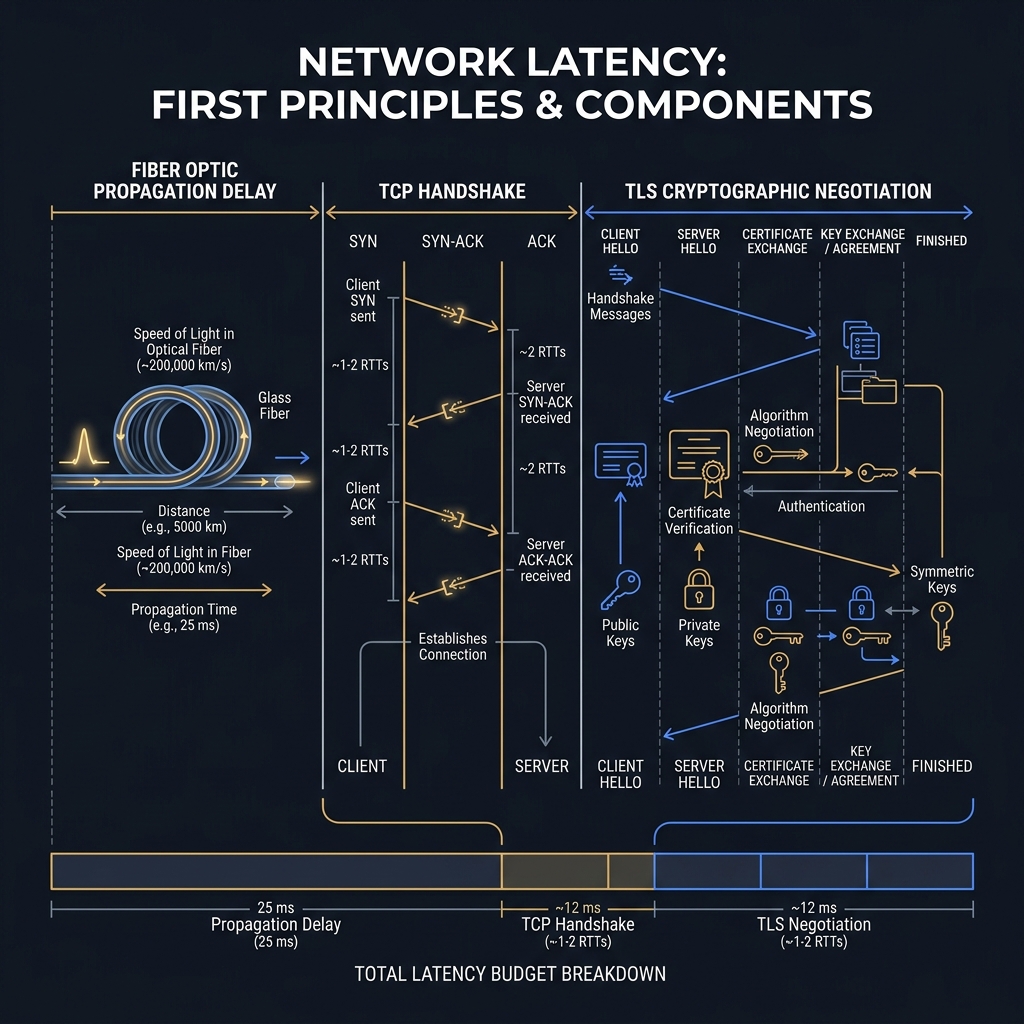
Latency is not an implementation detail — it is a physical constant that determines whether your architecture is viable. This post builds the latency budget model from the speed of light in fiber through TCP handshake mechanics, connection pool sizing, and the calculation every distributed system architect must run before committing to a topology.
Concept
Every senior engineer has encountered a system where the architecture looked clean on the whiteboard and performed catastrophically in production. Latency is almost always the culprit — not because the code was slow, but because the architect failed to model the physical constraints of network communication before committing to the topology.
This is not a soft skill. Latency arithmetic is deterministic physics. You can calculate it before writing a line of code.
The Speed of Light in Fiber: The Irreducible Floor
Light travels through vacuum at 299,792 km/s (186,000 miles/s). In fiber optic cable, the refractive index of glass slows it to approximately 200,000 km/s — roughly two-thirds of the vacuum speed. This gives us:
Propagation delay (one way) = distance_km / 200,000 km/s
Practical examples architects should memorize:
- New York to London (~5,570 km): ~28ms one-way, ~56ms RTT (propagation only)
- New York to San Francisco (~4,100 km): ~21ms one-way, ~42ms RTT
- Frankfurt to Singapore (~10,400 km): ~52ms one-way, ~104ms RTT
These are the irreducible floors. The actual RTT will be 20–80% higher due to routing overhead, queuing delays, and processing at each hop. The practical rule: assume 1.5x to 2x the straight-line propagation delay for real-world RTT between distant data centers.
What TCP Costs You
A TCP connection establishment costs exactly one full RTT before any application data is exchanged. The SYN → SYN-ACK → ACK sequence (the three-way handshake) takes:
TCP handshake cost = 1 × RTT
If TLS is layered on top (which it always should be in production), TLS 1.3 adds one additional RTT for the handshake:
TLS 1.3 total = 1 RTT (TCP) + 1 RTT (TLS 1.3) = 2 RTTs before first byte
TLS 1.2 total = 1 RTT (TCP) + 2 RTTs (TLS 1.2) = 3 RTTs before first byte
For a New York–London call (56ms RTT):
- TLS 1.3: 112ms before the first application byte
- TLS 1.2: 168ms before the first application byte
For an API that must respond in 200ms, you've already spent more than half your budget on connection establishment — before the server processes a single byte.
The Latency Budget Model
A latency budget is the formal allocation of end-to-end latency across the components of a request. It is the architect's contract with physics. Every distributed system should have one, defined before the technology choices are finalized.
For a user-facing request with a 200ms SLA:
| Component | Budget |
|---|---|
| Client-to-CDN/edge (last mile) | 20ms |
| Edge to API gateway | 10ms |
| API gateway processing | 5ms |
| Service A (business logic) | 30ms |
| Service A → Service B (internal call) | 15ms |
| Service B processing | 25ms |
| Database query (Service B) | 20ms |
| Response propagation (return path) | 10ms |
| Buffer (p99 variance) | 65ms |
| Total | 200ms |
The buffer column is where architects systematically fail. They budget for p50 behavior and deploy a system that violates its SLA at p99. A 65ms buffer on a 200ms SLA is not generous — for a system making database calls, it's tight.
Constraints
The TCP Head-of-Line Blocking Problem
HTTP/1.1 over TCP suffers from head-of-line blocking: a single lost packet stalls all in-flight requests on that connection. HTTP/2 multiplexes streams over a single TCP connection — but TCP-level packet loss still blocks all HTTP/2 streams (TCP-level head-of-line blocking, distinct from HTTP-level). HTTP/3 (QUIC) solves this by moving to UDP with per-stream loss recovery.
For internal microservice communication: prefer HTTP/2 (gRPC) over HTTP/1.1 REST when call frequency is high and latency is critical. For high-packet-loss environments (mobile, satellite): HTTP/3 becomes necessary.
Connection Pooling: The Handshake Amortization Strategy
Connection establishment is expensive. The solution is amortization: pay the handshake cost once, then reuse the connection for many requests. This is connection pooling.
For an HttpClient making 1,000 requests/second to a downstream service:
- No pooling: 1,000 TCP+TLS handshakes/second ≈ 1,000 × 2ms RTT (internal) = 2,000ms of wasted handshake time per second — a budget disaster.
- Pool of 20 persistent connections: 20 handshakes, amortized across 1,000 requests. Handshake overhead per request ≈ 0.04ms.
The correct pool size formula is derived from Little's Law:
Pool size = Throughput (requests/s) × Latency (s)
For 1,000 RPS at 20ms average service time: pool size = 1,000 × 0.020 = 20 connections. Going above 20 wastes resources; going below creates queuing.
Nagle's Algorithm and Small-Packet Latency
TCP's Nagle's algorithm buffers small writes to coalesce them into larger packets, reducing network congestion. For bulk data transfer, this is beneficial. For request-response APIs sending small payloads (a 200-byte JSON body), Nagle introduces up to 40ms of artificial delay by waiting for more data before sending.
In .NET, the fix is explicit: set Socket.NoDelay = true on any socket used for latency-sensitive communication. HttpClient in .NET 5+ does this by default through SocketsHttpHandler. For raw TcpClient usage, you must set it explicitly.
Trade-offs
Synchronous Chained Calls: The Latency Multiplication Trap
Consider three services in a synchronous call chain: A → B → C → D. If each service takes 20ms of processing time and has a 10ms internal RTT to the next service:
Total latency = 20 + 10 + 20 + 10 + 20 + 10 + 20 = 110ms
Now add one more service: A → B → C → D → E (same parameters):
Total latency = 20 + 10 + 20 + 10 + 20 + 10 + 20 + 10 + 20 = 140ms
The relationship is linear — every synchronous hop adds (processing + RTT) to the total. In a system with a 200ms SLA and 6ms internal RTTs (same data center), you can sustain roughly 6–8 synchronous hops before you exhaust the budget, and that's with zero variance headroom.
The architectural implication: synchronous call depth is a first-class architectural constraint, not an implementation concern. Enforce it at design time.
Async vs. Sync: Latency vs. Complexity
Converting to asynchronous messaging removes latency from the critical path but introduces consistency complexity. The choice is not "async is better" — it depends on whether the caller needs the result synchronously.
| Pattern | Latency Profile | Consistency | Operational Complexity |
|---|---|---|---|
| Synchronous HTTP chain | Additive (sums all hops) | Strong | Low |
| Parallel async HTTP fan-out | Max of parallel hops | Strong | Medium |
| Event-driven / fire-and-forget | Sub-ms publish | Eventual | High |
| Read-your-writes with async | Hybrid | Tunable | High |
For operations where the user doesn't need confirmation (email send, audit log write, recommendation refresh): go async. For operations where they do (order placement, payment): stay synchronous or use a hybrid pattern with a synchronous acknowledgment and async completion.
Code
The following models a latency budget as a first-class domain object, with a calculator that audits a proposed call graph before deployment:
// LatencyBudget.cs — architectural constraint modeling
public record CallHop
{
    public required string ServiceName { get; init; }
    public required double ProcessingMs { get; init; }
    public required double NetworkRttMs { get; init; }
    public double TotalMs => ProcessingMs + NetworkRttMs;
}

public class LatencyBudgetAudit
{
    private readonly double _slaMs;
    private readonly double _p99BufferPercent;

    public LatencyBudgetAudit(double slaMs, double p99BufferPercent = 0.30)
    {
        _slaMs = slaMs;
        _p99BufferPercent = p99BufferPercent;
    }

    public LatencyBudgetReport Evaluate(IReadOnlyList<CallHop> callChain)
    {
        double totalMs = callChain.Sum(h => h.TotalMs);
        double budgetWithBuffer = _slaMs * (1 - _p99BufferPercent);
        bool willViolateSla = totalMs > budgetWithBuffer;

        var breakdown = callChain.Select(h => new HopReport
        {
            ServiceName = h.ServiceName,
            AllocatedMs = h.TotalMs,
            PercentOfBudget = h.TotalMs / _slaMs * 100
        }).ToList();

        return new LatencyBudgetReport
        {
            SlaMs = _slaMs,
            UsableAfterP99Buffer = budgetWithBuffer,
            ProjectedTotalMs = totalMs,
            WillViolateSla = willViolateSla,
            HopCount = callChain.Count,
            Breakdown = breakdown,
            Recommendation = willViolateSla
                ? $"Call chain exceeds usable budget ({totalMs:F0}ms > {budgetWithBuffer:F0}ms). " +
                  $"Consider parallelizing hops or converting tail calls to async."
                : $"Call chain within budget. {(budgetWithBuffer - totalMs):F0}ms headroom."
        };
    }
}

// Example usage — architect's pre-design checklist
public class ArchitectureReviewSession
{
    public void RunLatencyAudit()
    {
        var audit = new LatencyBudgetAudit(slaMs: 200, p99BufferPercent: 0.30);

        var proposedCallChain = new List<CallHop>
        {
            new() { ServiceName = "api-gateway",       ProcessingMs = 5,  NetworkRttMs = 3  },
            new() { ServiceName = "order-service",     ProcessingMs = 25, NetworkRttMs = 6  },
            new() { ServiceName = "inventory-service", ProcessingMs = 20, NetworkRttMs = 6  },
            new() { ServiceName = "pricing-service",   ProcessingMs = 15, NetworkRttMs = 6  },
            new() { ServiceName = "postgres-orders",   ProcessingMs = 18, NetworkRttMs = 2  }
        };

        var report = audit.Evaluate(proposedCallChain);

        // Budget: 200ms SLA → 140ms usable (30% buffer reserved)
        // Projected: 5+3 + 25+6 + 20+6 + 15+6 + 18+2 = 106ms → within budget
        Console.WriteLine(report.Recommendation);
    }
}
The second example shows correct HttpClient connection pool configuration based on Little's Law sizing:
// HttpClientPoolConfigurator.cs — connection pool sizing from first principles
public static class HttpClientPoolConfigurator
{
    /// <summary>
    /// Configures an HttpClient with connection pool sized using Little's Law:
    /// pool_size = throughput_rps × avg_latency_seconds
    /// Adds NoDelay for latency-sensitive communication.
    /// </summary>
    public static IHttpClientBuilder AddPooledHttpClient(
        this IServiceCollection services,
        string clientName,
        string baseAddress,
        int expectedRps,
        double avgLatencyMs,
        bool noDelay = true)
    {
        // Little's Law: N = λ × W
        int littlesLawPoolSize = (int)Math.Ceiling(expectedRps * (avgLatencyMs / 1000.0));
        int poolSize = Math.Max(littlesLawPoolSize, 5); // floor at 5

        return services.AddHttpClient(clientName, client =>
        {
            client.BaseAddress = new Uri(baseAddress);
            client.DefaultRequestVersion = HttpVersion.Version20; // HTTP/2 — eliminates HOL blocking
            client.DefaultVersionPolicy = HttpVersionPolicy.RequestVersionOrHigher;
            client.Timeout = TimeSpan.FromMilliseconds(avgLatencyMs * 5); // 5× mean as timeout
        })
        .ConfigurePrimaryHttpMessageHandler(() => new SocketsHttpHandler
        {
            MaxConnectionsPerServer = poolSize,
            PooledConnectionIdleTimeout = TimeSpan.FromSeconds(90),
            PooledConnectionLifetime = TimeSpan.FromMinutes(15),
            EnableMultipleHttp2Connections = false, // pool reuses single HTTP/2 conn
            ConnectTimeout = TimeSpan.FromMilliseconds(500),
            // NoDelay is default true in SocketsHttpHandler — explicit for clarity
            InitialHttp2StreamWindowSize = 65536
        });
    }
}

// Registered in Program.cs:
// services.AddPooledHttpClient(
//     "inventory-client",
//     "https://inventory-service.internal",
//     expectedRps: 500,
//     avgLatencyMs: 20);
Further Reading
- Module 3 – Distributed Systems Fundamentals — CAP theorem and the latency-consistency trade-off
- Module 8 – Load Balancing & Traffic Management — upstream latency and connection reuse strategies
- Module 13 – Reliability Engineering & SLOs — translating latency budgets into SLO definitions
- Module 9 – API Design & Contracts — protocol selection (REST vs. gRPC vs. GraphQL) through a latency lens
External references:
- Gregg, B. (2020). Systems Performance: Enterprise and the Cloud, 2nd Ed. Pearson.
- Kleppmann, M. (2017). Designing Data-Intensive Applications. O'Reilly, Ch. 8.
- "Numbers Every Programmer Should Know" — Jeff Dean, Google.